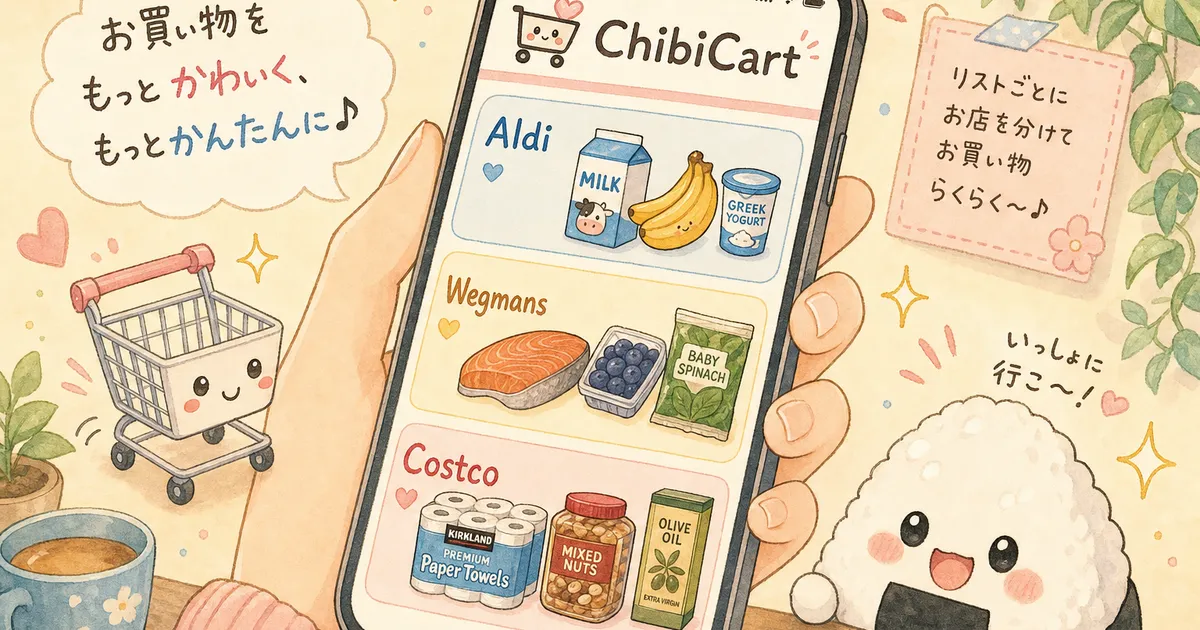
Milk to Aldi, Salmon to Wegmans: A Shopping List Per Store, Shared in Real Time
It’s Sunday evening. Your partner is doing the Aldi run on the way home Tuesday for milk, eggs, and the cheap snack bars. You’re hitting Wegmans on Wednesday for the salmon and the one specific yogurt your kid eats. Costco is on Saturday. The Memorial Day cookout is the 25th. 🛒
Somewhere in that plan, somebody is going to forget which store has the salmon. Or buy a second gallon of milk. Or stand in the Wegmans cheese case wondering if Aldi already covered the parmesan.
This is the shape of grocery shopping in May 2026. A Food Dive headline this morning flagged that grocery shoppers are increasingly trading down to lower-priced retailers — switching stores, not just brands, to keep the weekly bill in line. Households aren’t picking one store anymore. They’re routing items to whichever store is cheapest or best for that specific thing.
The problem isn’t the strategy. It’s that most shopping lists weren’t built to handle it.
What Is a Shopping List Per Store?
A shopping list per store is one shared plan that splits your weekly groceries by which store each item belongs at — milk to Aldi, salmon to Wegmans, paper towels to Costco — instead of one flat list that everyone ignores.
Think of it as a routing layer. The list itself decides where each item goes. Whoever is shopping that day pulls up only the section for the store they’re at, checks items off in real time, and the rest of the household sees it instantly.
It’s the difference between handing your partner a 30-item dump and saying “good luck” versus handing them a focused 8-item Aldi list that already knows what’s been bought elsewhere.
Why Trade-Down Shopping Breaks a Single Flat List
When you used to buy everything at one store, a flat list worked fine. You’d walk the aisles in order, check things off, done.
Trade-down shopping breaks three assumptions that flat list was built on:
One trip becomes three or four. Aldi for the basics. Wegmans for the proteins and produce you actually trust. Costco for the bulk paper goods and frozen. Maybe a quick Trader Joe’s pop-in. The list now has to survive being interrupted across three days and two shoppers.
You forget which store has the better price on what. Olive oil is meaningfully cheaper at Costco. Salmon is dramatically better at Wegmans. Milk is barely worth a dollar at Aldi. If you can’t see those store assignments at a glance, you default to whichever store you happen to be in — which kills the savings the trade-down was supposed to deliver.
Two shoppers double-buy. One person hits Aldi Tuesday. The other hits Wegmans Wednesday. Without a live shared list, the milk story above happens about once a month — and so does the we both forgot the bread story.
The list needs to be split by store, shared in real time, and aware of what’s already in someone else’s cart.
How to Set Up a Shopping List Per Store in 5 Minutes
Do this once Sunday evening. Reuse it every week.
1. Lock in what each store is for.
Decide once, stop debating in the aisle. A typical split for a trade-down household:
- 🛒 Aldi (or Lidl, Walmart) — milk, eggs, snack bars, basic dairy, pantry staples. Anywhere the brand doesn’t matter and the price gap is real.
- 🐟 Wegmans (or Whole Foods, Sprouts) — fish, prepared foods, the specific yogurt or cheese the kid will actually eat, fresh produce you’re picky about.
- 🏬 Costco (or Sam’s, BJ’s) — paper goods, freezer proteins in bulk, household supplies, the rotisserie chicken.
- 🥬 Farmers market or local produce stand — in-season tomatoes, eggs, anything where flavor beats price.
Write the rules down once. The next time someone says “should we just grab eggs here?” the answer is already on the list.
2. Group every item under its store.
Don’t write a flat list and try to sort it later. As you add an item, drop it under the store it belongs at. In ChibiCart, you can do this with per-item notes — tag each item with aldi, wegmans, or costco and filter by note before you walk out the door.
The goal: when someone pulls up the list at Aldi, they see only the Aldi items. Not 30 things they have to mentally filter.
3. Share the list with everyone shopping.
This is the entire ballgame for split-trip households. If your partner is doing the Aldi run Tuesday and you’re doing Wegmans Wednesday, you both need the same live list. The moment one of you checks off “milk,” it disappears from the other’s view — within seconds, not at the next sync.
This is exactly what ChibiCart’s shared real-time list is built for. One list, multiple shoppers, updates pushed to every device the instant an item gets checked. No more two gallons of milk.
4. Mark the conditional items.
Not every item has a fixed store. Tag the flexible ones so the on-the-spot decision is easier:
- ✅ Need at this store — won’t leave without it
- 👀 If it looks good — buy at the farmers market, skip otherwise
- 🔁 Backup at Aldi — if Wegmans is out or overpriced, fall back
5. Carry an “already bought” memory.
Double-buying is the biggest waste in trade-down shopping. A list that keeps checked-off items visible — not deletes them — lets you scroll back at Wegmans and confirm: “Yes, partner already grabbed milk at Aldi. Skip dairy.”
What This Looks Like for a Memorial Day Week
Here’s a real Sunday-to-Sunday example for a household of two adults and one kid, planning around the May 25 cookout:
Aldi (Tuesday after work, ~$40)
- Milk (1 gal)
- Eggs (dozen)
- Snack bars (2 boxes)
- Bread (2 loaves)
- Pasta (3 boxes)
- Cheese block
Wegmans (Wednesday lunch, ~$55)
- Salmon (2 lb, for Friday dinner)
- That one specific kid yogurt
- Burger patties (cookout, 8-pack)
- Hot dog buns (bakery)
- Fresh basil
Costco (Saturday morning, ~$120)
- Paper plates + napkins (cookout)
- Frozen berries (5 lb)
- Rotisserie chicken (Sunday dinner)
- Olive oil (2L)
- Ground beef (4 lb, freezer)
Farmers market (Saturday morning, ~$25)
- Tomatoes 👀
- Strawberries 👀
- Local eggs 🔁 (backup: Aldi if market’s out)
One shared list. Three trips. Two shoppers. Zero duplicate milks.
Why ChibiCart Handles This Well
ChibiCart was built around the shared, real-time list — which turns out to be exactly the routing layer trade-down shopping needs. Here’s how the five steps map onto the app:
- Per-store grouping via notes and categories — tag each item with the store it belongs at, then filter before you walk out the door.
- Real-time sync across devices — share the list with your partner. The moment they tap an item as bought, it updates on your screen instantly. Phones, tablets, web — all live.
- Offline support — Costco’s cell signal is famously bad. ChibiCart works fully offline as a PWA (a web app that runs without internet) — your checks queue up and sync the second you get bars again.
- Voice input — driving home from Wegmans and remembering you need paper plates? Tap the mic and say “add paper plates to the Costco list.” Done before the light turns green.
- History view — already bought items stay visible, checked off. Both shoppers can scroll the same list and see what’s covered without guessing.
No “family plan” upsell. No enterprise dashboard. Just one shared list that knows where each item lives. Try it at chibicart.com before your Memorial Day shop.
Stop Making the Routing Decision in the Aisle
Trading down isn’t a one-week thing. Households are going to keep mixing Aldi, Wegmans, and Costco for as long as the price gaps are real — which, going by the May 2026 reporting, is going to be a while.
The shopping has gotten more strategic. The lists need to keep up.
A shopping list per store isn’t a fancier list — it’s a coordinated one. Split by store, shared between shoppers, updating live, and honest about what’s already in the cart. Set it up once on Sunday. Reuse it every week. Stop standing in the Wegmans cheese case trying to remember if Aldi already had it covered. ✨