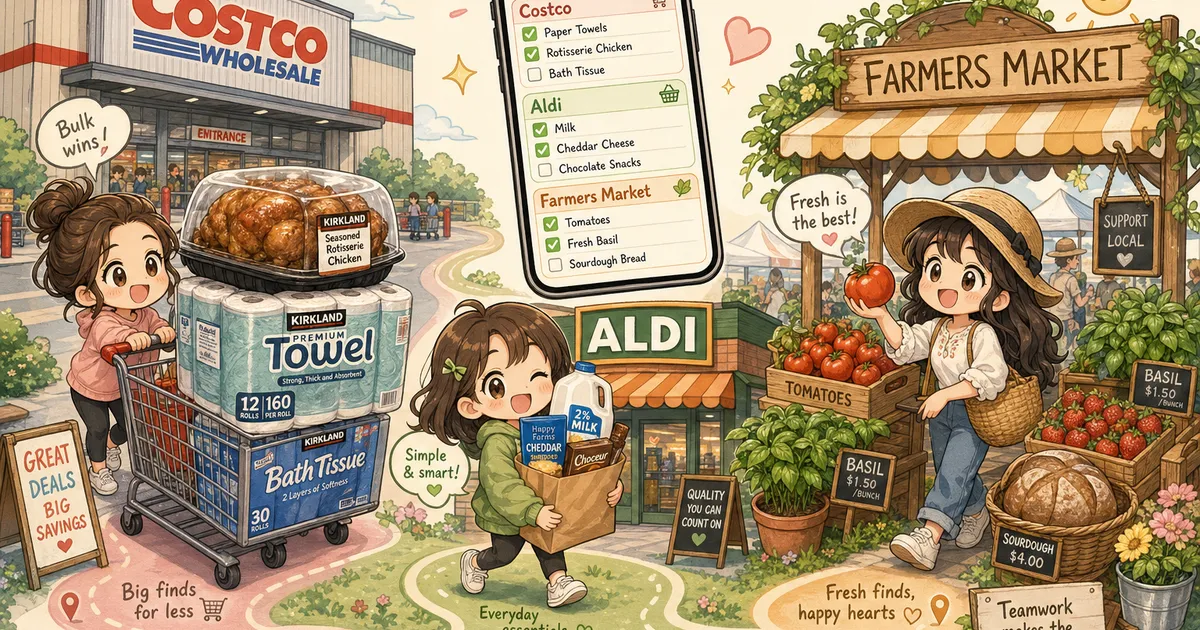
The Multi-Store Grocery Shopping List: One Plan for Costco, Aldi, and the Farmers Market
You’re standing in the Aldi cereal aisle when your partner texts: “Did you already grab the rotisserie chicken at Costco yesterday, or am I getting one?” You did. They didn’t know. Now there are two chickens in your future. 🐔
This is the new shape of weekly groceries. Costco for the bulk staples. Aldi for the snacks and dairy. The Saturday farmers market for the tomatoes that don’t taste like styrofoam. Maybe a quick stop at the Whole Foods Daily Shop that just opened nearby.
It’s not chaos — it’s a strategy. But strategies break the second you can’t remember which item belongs at which store, or who already bought what.
What Is a Multi-Store Grocery Shopping List?
A multi-store grocery shopping list is a single, shared plan that splits one week’s groceries across two or more stores — by price, quality, and trip logistics. Instead of one giant list dumped into a generic notes app, items are grouped by where they should actually be bought.
The practice has a nickname this year: playing grocery chess. Coverage in Supermarket News and Grocery Dive in May 2026 has tracked how millennial and Gen X shoppers now routinely split their weekly haul across 2-4 stores — Costco, Aldi, Walmart, the farmers market, and the small-format urban grocers like the new Whole Foods Daily Shops opening in Boston, Chicago, and Philadelphia.
The motive is simple. You can save real money on bulk paper goods at Costco, get the cheapest dairy and snacks at Aldi, and still get a tomato that tastes like a tomato — but only if you keep all three trips coordinated.
Why Does Multi-Store Shopping Get Messy So Fast?
A single-list app assumes one trip, one store, one shopper. The multi-store reality breaks all three assumptions at once.
You forget which store has the better price. Olive oil is cheaper per liter at Costco. But only if you remember that before you grab the small bottle at Aldi out of habit.
You buy the same thing twice. One person stops at Aldi on the way home Tuesday. The other hits Costco Saturday morning. Without a live shared list, the rotisserie chicken story above happens at least once a month.
You forget the farmers market half of the list. It’s Saturday. You’re tired. The market closes at 1 PM. Your tomato-and-stone-fruit list is on a notes app you haven’t opened in three days.
You can’t decide on the spot. You’re at Costco, staring at a 5-pound bag of strawberries. Should you grab them, or are you better off waiting for the farmers market tomorrow? Without seeing your full multi-store plan, you can’t answer.
A paper list can’t solve this. A single-shopper app can’t either. You need a list that’s split by store, shared in real time, and updated the moment something gets bought.
How to Build a Multi-Store Shopping List That Actually Works
Five steps. Each one solves one of the failures above.
1. Pick your roles for each store.
Not every store is for every item. Lock in what each store is for — and stop second-guessing it in the aisle:
- 🏬 Costco — bulk staples, paper goods, proteins for the freezer, household supplies (12+ week cadence)
- 🛒 Aldi or Walmart — weekly basics, dairy, snacks, pantry refills (under-$3 items where the brand doesn’t matter)
- 🥬 Farmers market — produce that’s in season, eggs, anything where flavor beats price
- 🍎 Whole Foods / Daily Shop / specialty — the one or two things you can’t get anywhere else
Writing these roles down once means you stop debating “should I grab this here?” on every trip.
2. Group every item under the store that owns it.
Don’t write a flat list and try to sort it later. Group as you go. A shared list with per-store sections turns a 30-item dump into four short lists you can actually scan from the parking lot.
3. Share the list with everyone shopping.
This is the entire ballgame. If your partner is hitting Aldi on Tuesday and you’re hitting Costco on Saturday, you both need to see the same list, updating live. The moment one person checks off “rotisserie chicken,” it has to disappear from the other person’s view — within seconds, not at the next sync.
This is exactly what ChibiCart’s shared real-time list is built for. One list, multiple shoppers, updates pushed to every device the instant an item gets checked. No more duplicate chickens.
4. Mark the “only if you see it” items.
Farmers markets and the Daily Shop format are unpredictable. The strawberries might be perfect Saturday — or they might be over. Tag those items as flexible:
- ✅ Need — won’t leave the store without it
- 👀 If it looks good — buy if quality is there, skip if not
- 🔁 Backup at Aldi — if the market doesn’t have it, fall back to Aldi tomorrow
This lets you be picky at the farmers market without going home empty-handed.
5. Carry a running “already bought” memory.
The single biggest waste at multi-store shopping is double-buying. A shared list that holds checked-off items visibly — not just hidden them — lets you scroll back and confirm: “Yes, partner already grabbed olive oil at Costco. Skip it at Aldi.”
What Does This Look Like in ChibiCart?
ChibiCart was built around the shared, real-time list — which turns out to be exactly what multi-store shopping needs.
Here’s how the five steps map onto the app:
- Per-store grouping — create a list per store (Costco, Aldi, Farmers Market) or one big list with category headers. Either works.
- Real-time sync — share the list with your partner. The moment they tap an item as bought, it updates on your screen instantly. Works across phones, tablets, and the web.
- Offline support — Costco’s cell signal is famously bad. ChibiCart works fully offline as a PWA — your checks queue up and sync the second you get bars again. No spinning loaders, no lost taps.
- Voice input — driving home from Aldi and remembering you forgot something for the farmers market? Tap the mic and say “add tomatoes, basil, and a baguette to the farmers market list.” Done before the light turns green.
- History view — already bought? It shows up checked off, not deleted. Both shoppers can scroll the same list and see what’s covered.
No enterprise dashboard. No “family plan” upsell. Just one shared list that handles the chess game.
A Real Sunday-Through-Saturday Example
Here’s a week of multi-store groceries for a household of two adults and one kid, organized the ChibiCart way:
Costco (Saturday, ~$140)
- Rotisserie chicken (1)
- Eggs (24-pack)
- Paper towels (12-pack)
- Olive oil (2L)
- Frozen berries (5 lb)
- Ground beef (4 lb, freezer)
Aldi (Tuesday lunch break, ~$45)
- Milk (1 gallon)
- Bread (2 loaves)
- Yogurt (8 cups)
- Snack bars (2 boxes)
- Cheese (block + shredded)
- Pasta sauce (3 jars)
Farmers Market (Saturday morning, ~$30)
- Tomatoes (2 lb) 👀
- Strawberries 👀 (skip if Aldi’s were good)
- Basil (1 bunch)
- Sourdough (1 loaf)
- Local eggs 🔁 (backup: Aldi if market’s out)
One shared list. Three trips. Two shoppers. Zero duplicate chickens.
Stop Playing Grocery Chess in Your Head
The shopping has gotten more strategic. The lists haven’t kept up.
A multi-store grocery shopping list isn’t a fancier list — it’s a coordinated one. Split by store, shared between shoppers, updating live, and honest about what’s already in the cart.
Play grocery chess on a real board, not in your head. Try ChibiCart and run your first multi-store week from one shared list. 🛒✨