The End-of-School-Year Party List Nobody Wants to Organize
You just got the text. The room parent dropped a message in the class group chat: “Hi everyone! End-of-year party is next Friday. Can everyone sign up for something? We need plates, drinks, fruit trays, decorations…” And then 23 parents reply with a mix of “I’ll bring napkins!” and “What did someone already claim?” and radio silence from eight others.
Welcome to the end-of-school-year party shopping list — the annual coordination nightmare that nobody volunteers to manage.
Why Class Party Lists Always Fall Apart
Here’s the pattern every room parent knows too well:
- Someone posts a list in a group text. It scrolls away within two hours.
- Parents claim items in scattered replies. Three people bring juice boxes. Nobody brings cups.
- The reminder text goes out 48 hours before. Half the parents have no idea what they signed up for.
- Day-of scramble. The room parent buys everything that’s missing out of pocket.
This isn’t a technology problem — it’s a visibility problem. When 20+ parents coordinate through a group chat, there’s no single source of truth. Claimed items disappear into the scroll. Unclaimed items are invisible.
What an End-of-School-Year Party List Actually Needs
A class party shopping list isn’t like your weekly grocery run. It has specific requirements that most list apps ignore:
- Multiple contributors who don’t live together (and barely know each other)
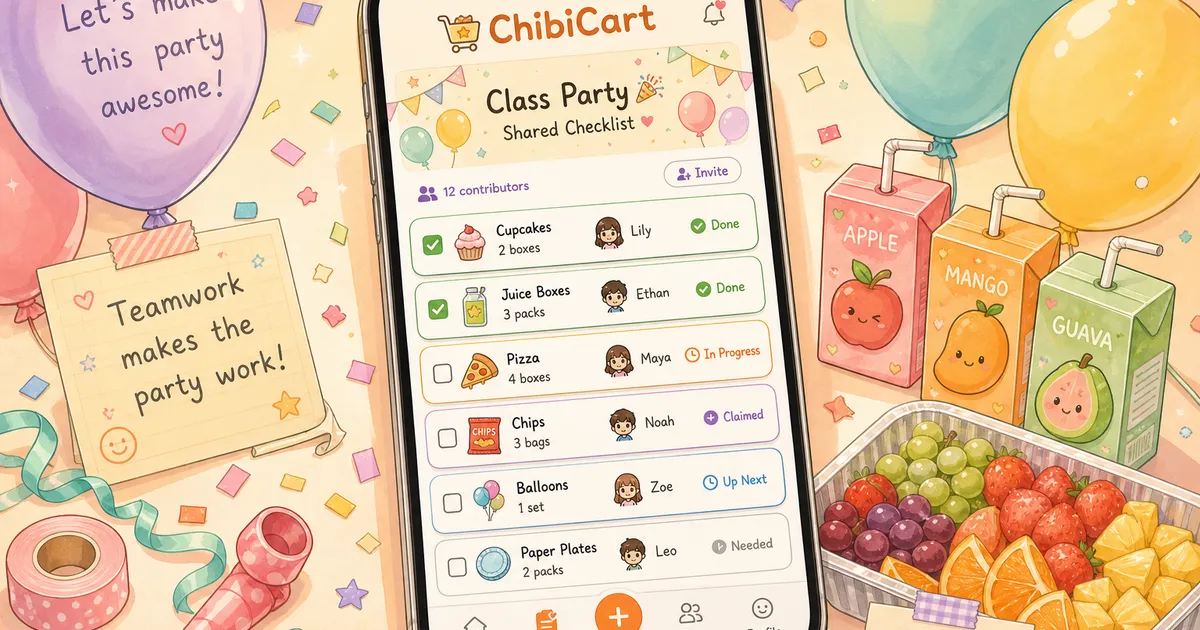
- Assigned items so everyone can see who’s bringing what
- Real-time updates so duplicates are obvious instantly
- No account required for the parent who will never download another app
This is exactly where a shared shopping list outperforms a group text. Not because it’s fancier — because everyone can see the same list, updated in real time, without scrolling through 47 messages to find their assignment.
ChibiCart handles this naturally. Share a link, assign items by section, and every parent sees what’s claimed and what’s still open — no app download required for anyone with the link.
How to Set Up a Class Party List in 5 Minutes
Here’s the system that room parents actually use:
Step 1: Create categories, not a flat list. Break items into sections: Drinks, Snacks, Main Food, Paper Goods, Decorations, Activities. Parents scan for their comfort zone.
Step 2: Add quantities. “Juice boxes” means nothing. “Juice boxes (2 packs of 24)” means something. Specific quantities prevent the three-people-bring-napkins problem.
Step 3: Share one link. Not a screenshot. Not a Google Doc that requires permissions. One link that opens instantly on any phone and updates live.
Step 4: Set a claim deadline. Give parents 3 days to claim items. After the deadline, the room parent fills gaps — but now it’s 2-3 items, not half the list.
Step 5: Leave the list open for last-minute adds. Someone always remembers that Ms. Johnson is gluten-free or that the classroom doesn’t have a bottle opener.
The Real Cost of Group-Text Coordination
A 2024 survey from the National PTA found that 62% of room parents spend their own money covering items that fell through the cracks during party coordination. The average out-of-pocket cost? $47 per event.
That’s not because parents don’t want to contribute. It’s because the system makes it too easy to lose track. A text message at 7 AM on a Tuesday gets buried by 9 AM. A shared list stays visible until the party happens.
What About Google Sheets or SignUpGenius?
They work — sort of. Google Sheets requires permissions and looks intimidating on mobile. SignUpGenius sends too many emails and feels like overkill for “bring plates and a veggie tray.”
The sweet spot is something that:
- Opens instantly from a text link (no login, no app)
- Updates in real time (no refresh, no “someone else is editing”)
- Works on any phone (not just iPhone, not just Android)
- Stays simple enough that the least-tech-savvy parent can use it
That’s a shared shopping list, not a spreadsheet. ChibiCart’s PWA opens in any browser, works offline if you’re in the store without signal, and syncs the moment you’re back online.
The Template: Copy This for Your Class Party
Here’s a starter list that covers a typical end-of-school-year party for 20-25 kids:
Drinks (3-4 parents)
- Juice boxes x 48 (2 packs)
- Water bottles x 24
- Lemonade pitcher + cups
Snacks (3-4 parents)
- Fruit tray (pre-cut)
- Veggie tray with ranch
- Goldfish crackers (large box)
- Cheese sticks x 24
Main Food (2-3 parents)
- Pizza (coordinate with room parent on ordering)
- Sandwich platter OR bagel bites
Paper Goods (2 parents)
- Plates x 30
- Napkins x 50
- Cups (if not bringing lemonade)
- Utensils
Decorations (2 parents)
- Tablecloths x 3
- Balloons or banner
- Class photo display supplies
Activities (1-2 parents)
- Sidewalk chalk
- Bubbles x 24
- Autograph books or yearbook-signing supplies
Drop this into a shared list, send the link, and let parents claim sections. Done in 5 minutes instead of 5 days of text thread management.
One List, Less Chaos, Better Party
The end-of-school-year party should be about celebrating the kids — not about room parents chasing down RSVPs and buying emergency supplies at 7 AM on party day.
A shared list won’t make every parent respond on time. But it makes the status visible to everyone. Unclaimed items are obvious. Duplicates are impossible. And the room parent isn’t guessing who’s bringing what.
Try ChibiCart for your next class party list — share a link with your parent group and watch the chaos turn into a checklist. 🎉