The Graduation Party Shopping List That Won't Fall Apart
Your kid just walked across that stage. Cap toss. Tears. Photos. And now 14 people are texting you about what to bring to the party on Saturday. Aunt Linda is “handling dessert” (but which dessert?). Your best friend says “I’ll grab drinks” (for 40 people?). And somehow nobody claimed plates, napkins, or ice. 🎓
This is the graduation party shopping list problem — and it falls apart the same way every May.
Why Does Graduation Party Shopping Always Turn Into Chaos?
Unlike a regular grocery run, graduation parties involve 5-15 contributors who don’t normally shop together. The coordination happens across scattered group texts, Facebook comments, and verbal commitments at the ceremony itself.
Here’s what typically goes wrong:
- Three people bring chips. Nobody brings plates to put them on.
- “I’ll handle the drinks” means one case of soda, not enough for 40 guests.
- Last-minute additions get lost in a text thread 47 messages deep.
- The grad’s dietary requests (vegan friends, nut allergies) reach some contributors but not others.
The core issue isn’t that people are unreliable — it’s that group texts are terrible coordination tools. Messages scroll past. Nobody has the full picture. There’s no single source of truth.
How a Shared Graduation Party Shopping List Actually Works
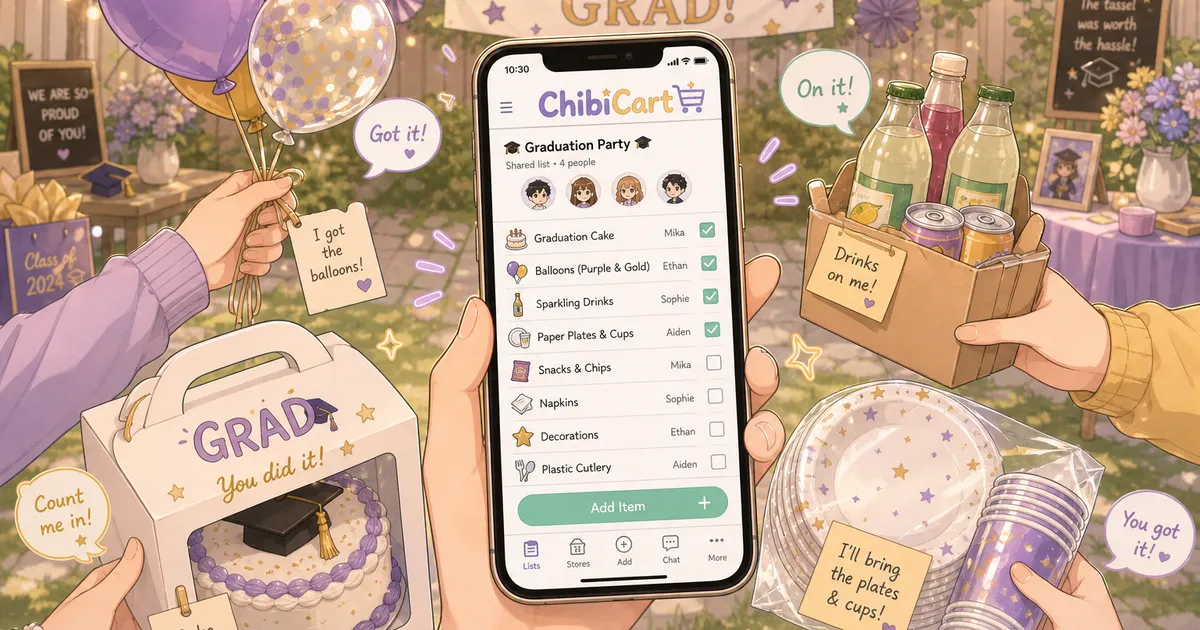
A shared list solves this by giving every contributor one place to see what’s claimed, what’s missing, and what’s changed — updated in real-time.
Here’s the 5-minute setup that prevents party-day panic:
Step 1: Create sections by category. Break your graduation party shopping list into clear zones:
- 🍖 Main dishes (burgers, pulled pork, veggie option)
- 🥗 Sides and salads
- 🍰 Desserts
- 🥤 Drinks (calculate 3 drinks per guest)
- 🎈 Decorations and supplies
- 🍽️ Paper goods, utensils, ice
Step 2: Share with contributors. Send one link. Everyone sees the same list. When Aunt Linda claims “chocolate cake” under desserts, it’s visible to all — no duplicate cakes.
Step 3: Let people self-assign. Each person taps the items they’re bringing. The list shows who’s handling what in real-time, so gaps are obvious immediately.
Step 4: Add quantities. “Drinks” isn’t enough. “6 cases of water + 4 cases of soda + 2 cases of sparkling for 40 guests” prevents the one-case-of-soda situation.
What Makes This Better Than a Group Text?
A group text works fine for 3 people buying pizza. It collapses at graduation-party scale because:
| Group Text | Shared List |
|---|---|
| Messages scroll past | Items stay visible until checked off |
| No one sees the full picture | Everyone sees all sections at once |
| Changes get buried | Updates appear in real-time |
| Works only if everyone reads every message | Works even if people check once |
ChibiCart handles this naturally — create a list, share the link, and everyone sees updates as they happen. It works offline too, which matters when you’re shopping in a crowded warehouse store with spotty signal the day before the party. 📱
The Graduation Party Quantity Cheat Sheet
For a 40-person party (the average graduation gathering), here’s what actually gets consumed:
- Protein: 1/3 lb per person = 13 lbs of burgers/chicken
- Sides: 4-5 oz per person per side = plan 3-4 sides
- Drinks: 3 per guest = 120 drinks total (mix of water, soda, juice)
- Ice: 1 lb per person = 40 lbs minimum
- Plates/napkins: 2x guest count (people grab seconds)
- Dessert: 1.5 servings per person (graduation crowds eat more cake than you’d think)
Put these quantities directly in your shared list so contributors know what “handling drinks” actually means in practice.
How to Handle Last-Minute Changes Without the Panic Spiral
Someone always backs out 48 hours before. The weather changes and you move indoors. The guest count jumps from 40 to 55 because your grad invited the entire friend group.
With a shared list that updates in real-time:
- Add new items — they appear for everyone instantly.
- Bump quantities — contributors see updated numbers without a new group text.
- Reassign orphaned items — if someone drops out, their claimed items become unclaimed and visible.
No frantic calling around. No “did you see my text?” No spreadsheet that someone forgot to refresh.
You can set this up in ChibiCart in about 2 minutes — create the list, organize by category, share the link to your group chat once, and let people claim items at their own pace.
The Real Deadline Most People Miss
Graduation parties often happen the same weekend as the ceremony. That means:
- Thursday: Confirm final guest count and quantities
- Friday: Everyone shops (or you discover gaps)
- Saturday morning: Party setup, last-minute ice/produce run
The mistake is waiting until Friday to coordinate. By then, stores are picked clean of party platters and bulk items. Build your shared graduation party shopping list by Wednesday and let contributors shop on their own schedule throughout the week.
Your Graduation Party Won’t Coordinate Itself
Graduation season is short and emotional. You don’t want to spend it chasing text threads and making frantic Target runs at 9 PM.
One shared list. One link. Everyone sees the same thing. That’s the difference between a celebration that flows and one where you’re apologizing for running out of plates at 2 PM. 🎉
Set up your graduation party list today — it takes less time than reading one more group chat message.